Showing posts with label Teaching. Show all posts

Friday, July 14, 2023

Tips for Creating Landscapes

Photo of the View from the top of Cedar Butte


When painting landscapes, I like to use a reference photo as a guide to help capture atmospheric and realistic detail. You may also find inspiration by painting outdoors (en plen air). Here's a photo I took at the top of Cedar Butte. See my September 2022 post, Painting Using MS Paint 3D -- How To.


My Paint 3D Landscape


I painted the background first, then added foreground elements such as bushes and trees later. For oils and acrylics, you may choose to lay down a darker color for the background and work up in value for the addition of clouds. For pastels, simply start with paper that is already a neutral (not white) color.


Use color temperature to create the illusion of depth. Add opposite colors to either cool down the color of mountains in the background or warm up the trees in the foreground. I chose to lay down bands of color in my background then framed the sky with an outline of the mountains. I chose a cooler purple for my mountains and gradually got warmer toward the foreground. My painting is brighter than the photo. Adding the trees over the background in contrasting dark green (instead of black) continued to elevate the overall temperature.

Bob Ross painting with a cabin


Create a focal point in your in the composition. This can be a barn or small outbuilding (palette knife comes in handy for the texture), or even a large, interesting tree. You may choose to make the barn stand out by using sharp contrast in colors or values and shading for more emphasis. This painting by Bob Ross would be fun to try in pastels.


Another Bob Ross painting using a palette knife
and a two-inch brush

Use the palette knife to add texture and crisp edges, Bob Ross used the edge of his knife to create water lines next to the shoreline and ripples in the water. It also helps create texture on snowy mountains. A large dry brush pulls down paint for the reflection. Then light, side-to-side strokes soften and blend for the illusion of water. His use of temperature in the rainbow-colored sky almost makes his composition like two different paintings.


Jeu and Bryce at Lake Sawyer
(2022), Patterson


Simplify the clutter (edit out unwanted details). Give the illusion of numbers, but don't try to paint every individual tree you see. Map out the overall shapes for the grouping of trees, then add just a few details. This is something that Impressionists like Monet mastered in suggesting a forest or line of trees.


Mary's Creepy Landscape


Try using a limited palette of colors and subtle variations between them. Use brighter, more saturated colors and more delicate brushwork for the focal point (compared to the rest of the painting). This one was done by one of my students at Franke Tobey Jones' Senior University. I'm guessing that the bright moon is the focal point. My favorite part is the turbulent water.


Beach in Pourville (1882), Monet


Embrace imperfection. You don't have to be completely accurate with values, colors, and structure as you would in a still-life or portrait. Impressionists like Claude Monet loved to paint beach scenes, often void of human figures, to create a mood and a soft composition of color. The only real value or shading comes in the cliffs framing the bottom right corner.


Landscape at Collioure (1905), Matisse


Employ timed sketches to improve your judgment. Practice painting on smaller canvases using quick sketches and limiting the time it takes to complete your painting. Famous artists used studies to plan the placement of elements, color scheme, and composition. It may also help you to decide when your painting is finished.


Grand Canyon of the Yellowstone (1872),
Thomas Moran


Let's finish with this spectacular landscape of the Grand Canyon of the Yellowstone by Thomas Moran. I love the contrast between the foreground and sunlit canyon. He painted several versions of the canyon, capturing the scenic view in all four seasons.


My brothers and their wives visited Yellowstone recently while attending my daughter's wedding in Montana. Two trees frame the view of the watery focal point in this photograph by my sister-in-law.

Wednesday, May 31, 2023

My Life as a Struggling Artist and Volunteer

Manet +/- Space Project, Lowell Elementary
I've been encouraged all my life to create art. While I am not as prolific as other artists, I do try to share what I've learned about art with others; and that has been one of my goals in retirement. Early on, my focus was volunteering in elementary schools, but that ended with the pandemic. I am now much more challenged to find outlets for my creativity.

Bo the Dog, PwC


Probably my most successful retirement endeavor has been volunteering with PawsWithCause. The non-profit organization allowed me to continue teaching others how to do art at paint parties, to employ salesmanship in raising money for a cause, show artwork of others, build community, and do custom pet portraits upon request.


Kandinsky Circles, Old Friends Club

I have been successful at teaching seniors in multiple locations, including assisted living communities, adult memory daycares, senior centers, and a senior university (in Tacoma). I've also taught online classes a few times. I don't understand why it takes so much effort to volunteer my services. Even with websites like VolunteerMatch, it is difficult to get pro-bono work that doesn't limit my own creativity or require me to use my own supplies.


My Degas Demo, FTJ Pastels Class


I've been happy teaching at Franke Tobey Jones' Senior University in Tacoma, where I get a stipend and get paid, but that's only twice a year, if I'm lucky. My students are a willing and captive audience. It surprises me that senior centers are less interested in doing art and favor playing Bingo. Assisted Living communities should also welcome someone to conduct art activities, but they have their own staff and such limited budgets. I wonder if I could apply for a grant to bring my own prepaid art supplies to senior communities.


Castle Landscape in Paint3D

So, here I sit in my office blogging about past experiences. I occasionally paint portraits or landscapes in my spare time. My brother helped encourage me to learn Paint3D and I've done several awesome paintings on my PC using a mouse. I've even tried homeschooling 'grandkids' and got paid to bring art lessons to a nearby summer camp. Both gigs challenged me to adapt my lesson plans for students ranging in age from 4-13 years old.


Palm Tree, Circle of Love Class


What all of this 'struggle' is meant to convey is that sometimes creativity is required in order to successfully dedicate oneself to volunteering. I guess I thought that it would get easier over time, and that with blogging and posting on Facebook more people would be asking me to teach classes and volunteer.


City Dog Park, Palm Springs, CA
Bryce and Friends, Redding, CA

Over the past few years, I've used our trips to Palm Springs as an opportunity to paint, do animal portraits of dogs from the local dog park, and develop lesson plans and project demos.


Retirement may not mean that you will stop working. Instead, you may find creative ways of playing and exploring your newfound independence with a spirit of adventure. Living a creative life means to focus on curiosity rather than a fear of failure. Imagination, innovation, and persistence are the energies that also help us solve problems. While I've experienced some disappointment along the way, I've enjoyed the process and haven't given up. As American Christian author and speaker Joyce Meyer once said, "Patience is not the ability to wait but the ability to keep a good attitude while waiting". 

Tuesday, January 10, 2023

MLK Jr -- Portrait of a Dreamer

MLK Jr. (2017), Glenridge
August of 2023 will mark the 60th anniversary of the 1963 March on Washington for Jobs and Freedom and Martin Luther King Jr's I Have a Dream speech. In February of 2017, a classroom of students from Glenridge Elementary School enlarged a photograph of MLK Jr. and posted it on a bulletin board in one of its hallways. It is a fun way to teach students about value range. My project used a black-and-white poster of Elvis Presley.

MLK Jr. (1962), Karsh

It turns out to be from the famous 1962 portrait by photographer Yousuf Karsh (1908–2002), on display at the National Portrait Gallery, Smithsonian Institution, in Washinton D.C. There is an I Have a Dream (2012) children's book with illustrations by artist Kadir Nelson. My brother has a book by Nelson with paintings of the Negro Leagues, some of which we saw at the Baseball HOF in 2019.

My First Year of Blogging: Teaching Art, Travels, and Observations, from August 2020, also includes MLK. Elvis, JFK, and de Kooning.
JFK (1965), de Kooning

JFK (1960), Rockwell

That same year, President John F. Kennedy was assassinated on November 22nd in Dallas, Texas. I remember it because it was my parents' wedding anniversary and my first-grade teacher cried when the announcement came over the PA system. Five years later, on April 4th, 1968, Martin Luther King Jr. was assassinated in Memphis, Tennessee. Norman Rockwell (1960) and Elaine de Kooning (1965) painted a series of portraits of the 35th President.


The Problem We All Live With (1964), Rockwell


In 1964, Norman Rockwell painted The Problem We All Live With, depicting six-year-old Ruby Bridges being escorted to an all-white elementary school during the New Orleans school desegregation crisis of 1960. Notice the racial slur and the tomato-stained wall.


Aesop's Fables (1970)
Dixie Café, (1948), Lawrence

The Smithsonian is a great place to view historical paintings. Here's one dealing with segregation by Jacob Lawrence. While I enjoy his colorful paintings, his compositional works in black-and-white are particularly striking. I gave a book (right) with such illustrations by Jacob Lawrence to my niece's 3rd-grade teacher.


Stone of Hope (2011), Lei Yixin


In August 2011, the Martin Luther King Jr. Memorial opened to the public in Washington D.C. Chinese sculptor Lei Yixin's inspiration came from a line from MLK's I have a Dream speech -- "Out of the mountain of despair, a stone of hope."


RFK (1972), Leroy Neiman


A month before his death, President Kennedy gave his own version of the I have a Dream speech. It was meant to be a call to action reminiscent of his inaugural address where he said, "...ask what you can do for your country." His brother (and Senator) Robert asked us to "Dream Things That Never Were". RFK's social justice agenda specifically targeted the poor and disadvantaged, while JFK's speech was about his desire for peace in his country, and MLK's speech dreamt of personal freedoms and a world free of discrimination. It's unfortunate that these three dreamers were singled out by fame-seeking assassins.


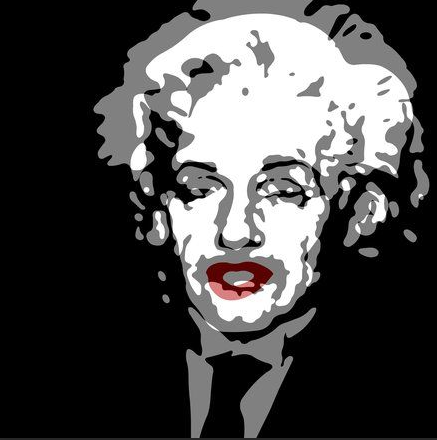
Brains and Beauty (Einstein
and Monroe), Troy Gua
Thomas Alva Edison (1890),
Abraham Archibald Anderson
You don't have to be a religious leader (like MLK Jr.), a politician (like JFK or RFK), an artist (like Jacob or Leroy), a scientist or inventor (like Edison or Einstein), a novelist or songwriter to be a dreamer.


Often, dreams lead to discoveries, breakthroughs, and even Nobel Prize winning contributions to the world. They reflect our personal values, behavior and aspirations to do good in the world.

Pablo Picasso was quoted as saying, "Action is the foundational key to all success."

Vincent Van Gogh may have said, "I dream my painting, and then I paint my dream."

I don't know who said it, but I like this quote: "Every possibility begins with the courage to imagine."

"You see things and you say, 'Why?' but dream things that never were, and I say, 'Why not?'" by George Bernard Shaw.

"Art has the power to transform, to illuminate, to educate, inspire and motivate." So have the courage to dream and share your art with others. Edgar Degas said, "Art is not what you see, but what you make others see."

Monday, October 31, 2022

Pumpkin Carving 2022

My Cheshire Cat (2022), Patterson

More and more I enjoy pealing the skin off a pumpkin to create layers of value for my jack-o-lanterns. The deeper you go, the lighter that area becomes. Completely cutout areas will be bright yellow, while the uncut (skin) areas will have the darkest value. A bonus feature of these shaded pumpkins is that they look good (unlit) in the daylight.

Here's my Cheshire Cat pumpkin. It looks much better with the ears punched through. I also love how leaving the skin around the eyes, nose, and mouth creates an outline, further emphasizing those features.

I carved triangles and diamonds in the lid and on the back side to create chimneys to allow heat to escape. If you carve your lid somewhat symmetrically, then you can rotate the lid to allow for ventilation.


Frankie (2021), Patterson

My favorite pumpkin from last year has to be my Frankenstein head. The lid made for great looking monster hair. By cutting slits in the top edge of the opening the hair was further reflected onto the face, and a larger slit created a gash for a scar. Sometimes the best carvings result from an inspiring pumpkin shape. I didn't need to carve ears, but I did use small scraps and toothpicks to create the electrodes on his non-existing neck.

If you are going to attach ears to your pumpkin, simply cut out an oval shape (or ring) then rotate it and reinsert so that the light can highlight it from both front and back. Notice also how the eyelids are suggested with skin as the outline, while the facial accents are again slits carved all the way through. No shading required!


Every year I search the web for ideas. My Cheshire Cat was inspired by a picture of a pumpkin carving that I found online. The hard drive of my desktop PC before I could get a copy of it on my printer. I also lost MS PowerPoint where I had stored the image. My wife's printer cut off part of the image, so I improvised. I had to figure out how to make the mouth using small triangles on the bottom and larger ones on the top. Everything was carved freehand without using any markers for laying out the lines. For Frankie, I used a photo of a drawing of the monster then made my own inspired design.

Harry (2022), Ken Patterson

I carved a Harry Potter face this year. The example I found has some wonderfully jagged lines and uses peeling for most of the face. The deepest cuts are for his scar (from he who will remain nameless), his eyes, ears, and at his temples. Surprisingly, it only took ~1 hour to complete. I ended up scraping the entire face later but forgot to leave skin for the dark eyebrows. I pushed straightened paperclips through the flesh (from the back) to attach pieces of pumpkin skin above the eyes. Now it looks much more like the young wizard instead of a creepy Chucky doll. It will look even better with glasses made out of wire. The black dots in his eyes are black-headed straight pins. I'm thinking of adding large green sequins for the irises. The entire look is growing on me. It looks better when viewed or photographed from above.


Daytime Harry (2022)


Here's how Harry looks during the daytime and with wire spectacles added. I also added some orange pumpkin sequins (couldn't find green) for irises.


Martha Stewart pumpkin & Mr. Bill

Our pumpkin carving party with the family was a great success. We served pizza and pumpkin pie and take-home caramel apples. We texted photos of our jack-o-lanterns to family members not in attendance and asked them to guess who carved which pumpkin. We also watched the Seahawks beat the NY Giants. Here are two cookie-cutter creations.


Traditional Jack-o-Lanterns


The next two are pretty traditional jack-o-lantern faces. They were carved free hand except for the mouth on the one on the left. He used a cookie cutter shape and repeated it to make the mouth. My sister-in-law got creative and made hair for her pumpkin by carving away the skin and some of the flesh. I like her skeleton nose complete with nostrils.


Symmetric Pumpkin & Chewbacca the Wookie

My sister-in-law's husband decided to carve his second pumpkin by reusing the same cookie cutter for the eyes and mouth. There was lots of hammering going on in order to get the cuts to go most of the way through the flesh. He even inverted the tool to get symmetry in the face. I chose to carve the head of Chewbacca the Wookie from Star Wars, although he could also pass for the Sasquatch.


The Mandalorian (2022), Ken Patterson


We grew two pumpkins this year but didn't carve them. I used another store-bought pumpkin to carve the Mandalorian helmet. It was challenging to carve a black and grey helmet with only little shiny spots on the metal shapes. The deepest cuts were for the eyes and the outside defining the ears and left and right sides of the helmet.


Since my daughter chose not to participate, and her uncle brought a green pumpkin, I carved Grogu ('Baby Yoda') from the Star Wars Disney+ television series The Mandalorian.


Three of the most challenging for me. Mandalorian actually looks best in darkness (below). I love how Baby Yoda looks at twilight (right). Tonight, a 9-yr-old girl told me how much she admired my pumpkins. And she recognized the Wookie! She was definitely a Star Wars fan!!


Here's a photo of my pumpkins all lit up on Halloween night!

Tuesday, October 11, 2022

My Inspirations for Creating Art

From Fox broadcast at Field of Dreams (8/12/21)

Lately, I have been inspired by what I see on social media, TV, commercial ads, and of course movies. I've even captured images from what is being displayed on my TV using my cellphone. It's overwhelming how many photos I've conveniently stored there. I wonder how the old masters would have used the technology and media of today to capture, store, and manipulate images more readily and without spending hours observing, sketching, and drawing what they saw. Of course, they had to rely much more on their own imagination, models, painting outdoors from nature, and the work of other artists for inspiration.

Paint 3D Landscapes
by Jon Patterson


Producing art can be its own inspiration. Practicing and experimenting with techniques and media provides new ideas and develops new skills. I'm constantly reading, consulting my own library of art books, researching topics and artists online, and journaling about future art posts. I find that my art colleagues and my own brother produce much more art than I do, which inspires me to create more art. I've already completed five new works using Paint 3D. And I'm working on an acrylic portrait of one of my favorite baseball players.


Ballet (after Degas)
Ken Patterson


While planning and preparing to teach art to others, I often get inspired to create my own examples for my students or pull images from online sources. For my pastels class, I tried my hand at reproducing a Degas painting as a way of employing many of the techniques I was intending to share with my students.


Bryce and Friends (2021), Ken Patterson

I am also inspired by things in my own life, including of course my pets. I look forward to our annual trip to Palm Springs and our visits to the California dog parks along the way. Here is a pastel version of a photo I took of my dog and two of his new dog park friends. The gravel surface gave me an opportunity to play with color and texture with a nod to impressionism.


Castle Landscape (2022), Ken Patterson


Sometimes my inspiration is a combination of an example I provided for a class, its rendition created by a student, and the challenge to recreate it in Paint 3D. I included it in my latest 'How To' post.


View from Cedar Butte (2022), Ken Patterson

Probably my favorite source of inspiration is nature. While I love doing portraits, I am learning to love painting landscapes, especially from photos. I plan to do more of these using some of my daughter's photos captured during her visits to Italy and adjacent countries. On our recent hike of the Cedar Butte Trail, I photographed the view from the top and painted it using Microsoft Paint 3D. Pretty good, considering I used a mouse on my desktop PC!


Milo Redwood & Studio


The work of other artists has inspired me in many ways. It inspires many of my blog posts. It's been fun for me to interview local artists and learn what inspires them. I often chat up artists when visiting their studios. I'll even engage with museum curators or volunteers to find out more about specific art exhibitions.


Son of Man (1963), René Magritte


Movies can be another source of inspiration and it's fun to watch for famous art being used in the background sets. I've blogged about that too, as far back as March 2020 with my Movie Art Cameos post. "The Thomas Crown Affair" uses the Metropolitan Museum of Art as a backdrop for its romantic art caper. In it, you will see works by Édouard Manet, Claude Monet, Camille Pissarro, Pablo Picasso, and, of course, René Magritte's "The Son of Man".

The photography can also be pretty impressive. Many of my brother's paintings were done using professional photographic compositions created by my sister-in-law.


So, what inspires you? Living with intentional observation, reading, journaling, sketching, drawing, taking photographs, taking art classes, visiting museums, and experiencing nature will enrich your life and may make you a better artist. If nothing else, it will allow you to appreciate life and share it with others.

Sunday, September 25, 2022

Painting Using MS Paint 3D -- How To

Gaylord, Michigan (2022), Jon Patterson

For a while now, I've been posting my brother's artwork that he masterfully accomplishes using Microsoft Paint 3D. It usually requires a tablet and stylus to adequately control the brush strokes using the tools. Unfortunately, the devices available to me are either PCs or Android tablets, so I will need to eventually purchase a MS Surface. Here's the latest painting by my brother. It was inspired by a Fall 2007 photograph my sister-in-law took in the northern part of the lower peninsula of Michigan. It's his third oil brush painting.


He did use the marker tool for very fine lines like the fencing in the background as the oil brush tool's smallest stroke width was too wide. He also used the watercolor brush to blend colors here and there. You'll find that it takes lots of practice to do blending with this tool.


So let's explore the modern world of digital painting! We'll start with a simpler portrait of a cat named Hopper using a photo from South County Cats that we use for PawsWithCause, the non-profit where I volunteer my time in retirement. When we sketch a shelter animal on a canvas for someone else to paint, we typically use Paint 3D to eliminate the background, isolating the animal itself. You may also use Photoshop to accomplish the same thing. This will allow you to lay down any shade you want (using the paint bucket tool) and then add details over it (sort of like underpainting).


My brother used Photoshop to make a transparent background with the cat at 40% opacity, and a second file has the cat at 100% opacity. Sometimes it's easier to color over if the subject is not so bold as 100% opacity. Hopefully at 40% opacity you can still make out the details, but you may also reference the original photo of your subject for the colors, shapes, and shading.


You'll have to overlay color to get a blended effect. But if you use the degree opacity -- which you can set for 7 of the 10 drawing tools -- you can sort of achieve a blended effect. Also, try different shades of a similar color to get the effect you want; i.e., make the overlay color have a hint of the "under" color by sliding along the rainbow color bar. I like the way the shag carpet came out in my background. Don't worry about getting every little detail purr-fect. You are allowed to edit. Since this is my first attempt, I tried nearly every type of brush (even the spray can) available with the tool.


Original Photo of a Painting

Although I am still limping by with a mouse, I decided to jump right into a more complicated landscape. I chose one with lots of color and appropriately Autumn leaves. It was a photo of a painting that I supplied for inspiration during my recent Acrylic Landscapes class at Franke Tobey Jones' Senior University in Tacoma, WA. I decided to do my painting free-hand from this photo.


Acrylic on Canvas


And here's an interpretation done in acrylic on an 8"X10" canvas by one of my students. Note how she chose to make the castle the focus of her painting. She listened to my tips and tricks, used a modified color scheme, edited out the mountain, and created her own composition.


Let's get started with my Paint 3D version and set the size of our canvas. For an 11x14", set the height at 2200 pixels and the width at 2800 pixels. For an 8x10", set the height at 1920 pixels and the width at 2400 pixels. For a square design, it may be ~2500 x 2500 pixels. The higher the pixel number, the higher the resolution (and the bigger the file size). Since you set this in Paint 3D, for a Paint 3D PROJECT (and not an image you are importing), the numbers apply to the whole project (if that makes sense).


The first painting step is to lay down the zones of color in the background, using broad (20-50 pixel setting) brush strokes, to serve as our underpainting. My brother recommended using primarily the oil brush tool for this painting.


Mine is a bit more detailed because I wanted to leave a space for the clouds and castle shape. The trees will eventually show through to the background, so I extended the dark gray shape to the right. It may be important to write down the RGB color codes you choose in the event you want to return to them later (e.g. for the pond reflection). Of course, you can rely on your eyes for choosing colors.


Most of the rest of the painting can be done with the oil brush set for narrower strokes (25 pixels or less). Experiment! Remember you can always hit the “Undo” button if you don’t like it! The “Undo” button can erase a seemingly unlimited number of previous strokes. While I was using a mouse, I noticed that I had to lift it up regularly, so that I didn't Undo large areas. This is especially true when scribbling in the clouds!


I used the marker tool to begin playing with the trees. Since I don't have to wait for paint to dry, I am able to freely move around and add overlapping details. I did some of it with the watercolor brush and even tried the spray can tool on the shadowy grass in the foreground (in later steps).


This picture has lots of colors in it, so I chose multiple shades of yellow, orange, green, etc. And remember, when you’re in “yellow” mode, you can slide that rainbow color bar toward orange if you want it more orange, or toward green if you want it more green. This is pretty much the final state of this painting. I like how my colors are brighter than the original. I probably could have made the grassy area in the foreground more vivid, but I was mainly playing with the tools.


Here's the final painting. Notice how the sky has been softened using a combination of watercolor strokes and the spray can tool. The horizon line has also been blended. I added in grass using the marker tool to give a bit more detail to the foreground. For my next challenge, I may try painting a dog.


Here's a kitschy painting of my 1-yr-old Shih Tzu masquerading as a Star Wars Wookie, Chewbacca. I call it Chewbailey.


Here she is dressed as an organ grinder's monkey. Her paws are raised above her head as if she's putting on the fez.


After hiking the Cedar Butte Trail in North Bend, I was inspired to capture the view from the top using my PC mouse in Paint 3D. Similar to the above landscape, I laid down bands of color for the sky using the oil brush. Then I worked on the purple mountain and the lower valley. After softening/blending the sky, I used the watercolor brush and spray can to create a sort of haze. I finished by drawing in the trees using a combination of the marker and other tools.